

How to Add an Image to Yahoo Signature (Step-by-Step Guide for 2026)
|
Quick Overview
|
This guide shows you how to add a picture to your Yahoo Mail signature. You will learn how to insert an image, such as a logo or personal photo, into your email signature to make it look professional. Use this guide to enhance your email with a polished signature.
Yahoo Mail does not have a simple “upload image” option like Gmail. This can confuse users who want to get inline images or update their new signatures from a desktop. In this article, we will explain methods for both desktop and mobile, cover options for images, and share effective fixes to make sure your images in signatures are clear and professional.
1. Before You Start: Yahoo Signature Image Requirements
2. How to Add an Image to Yahoo Signature on Desktop (Step-by-Step)
3. Yahoo Mail Signature Image Not Showing? (Fix Guide)
4. FAQ
Before You Start: Yahoo Signature Image Requirements
- Supported image formats (JPG, PNG, GIF)
Use JPG for photos. Use PNG for logos that need a transparent background. Use GIF for simple animations.
- Recommended image size for Yahoo signature
|
Type |
Recommended Size |
|
Logo |
150–300px width |
|
Photo |
100–150px square |
|
Banner |
600×150px |

Yahoo often has problems with local files when you try to add images to your Yahoo Mail signature. To prevent this, always host your images online and paste them into your signature. This way, your images will stay visible.
How to Add an Image to Yahoo Signature on Desktop (Step-by-Step)
This is the best way to add a picture to your Yahoo Mail signature.
Step 1. Open Yahoo Mail settings. Log in on desktop and click the gear icon → More Settings.
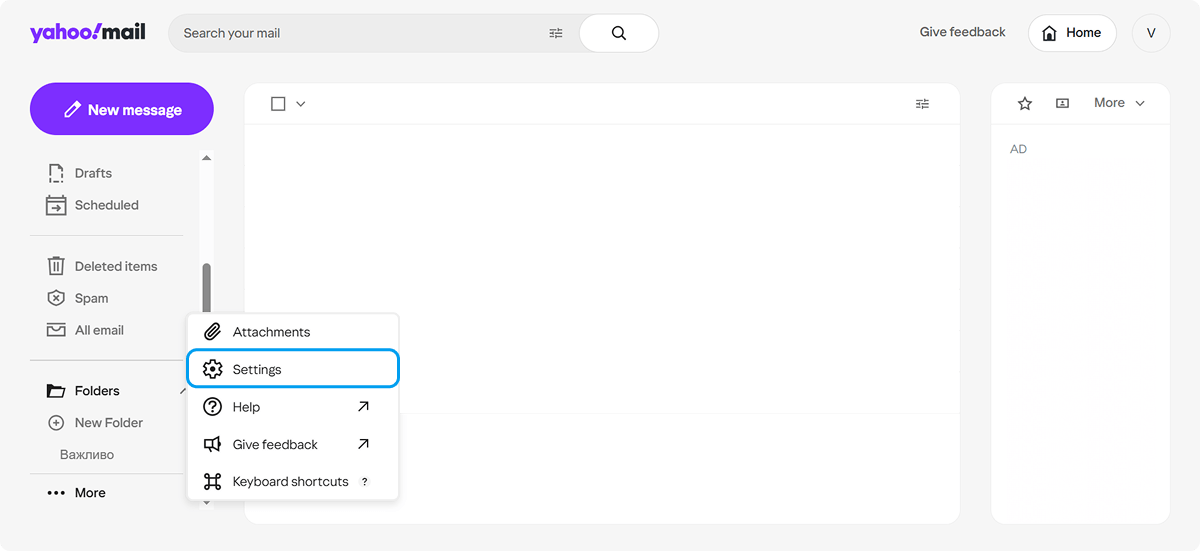
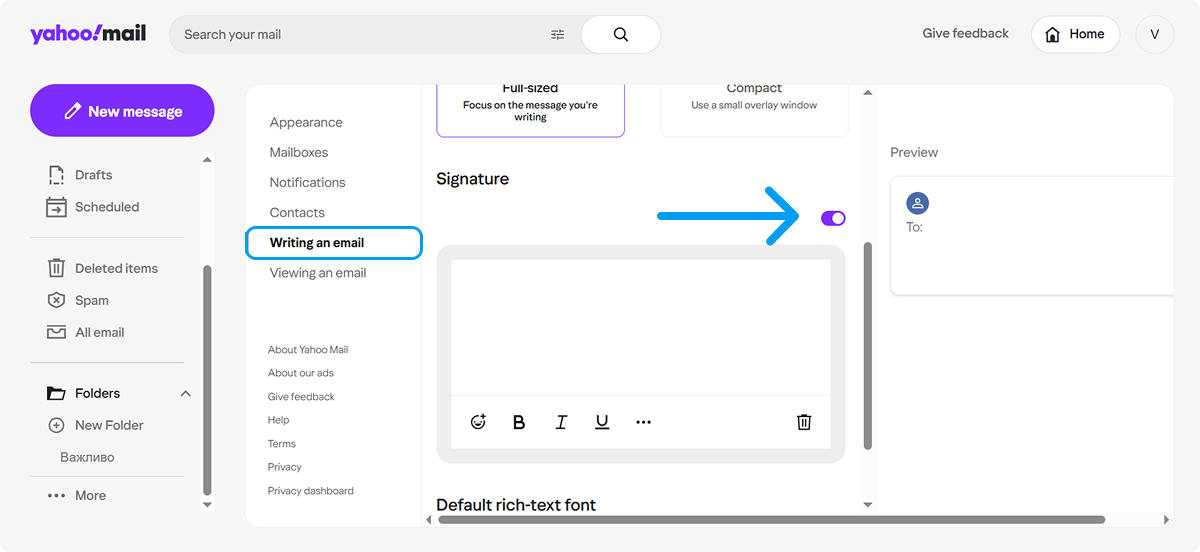
Step 2. Go to “More Settings” → Writing email.
Step 3. Enable Signature. Turn on the signature option.
Step 4. Paste or insert your image.
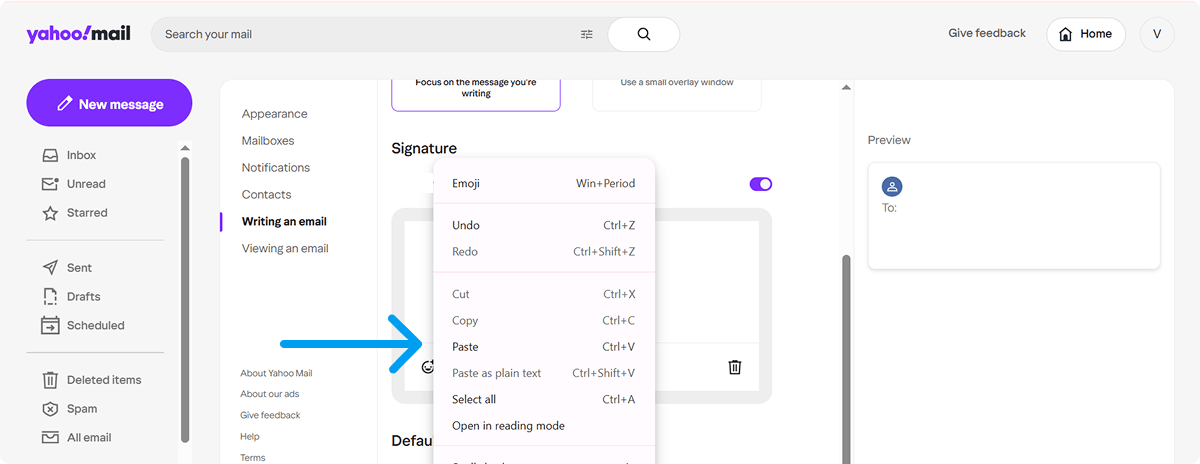
Note:
Upload your image to the internet. Then copy and paste it directly into the editor using Ctrl/Cmd + V. This is the best option for images when creating a new signature on the desktop.
Step 5. Please adjust the formatting by changing the text and spacing. Add your details and adjust the layout as needed.
Step 6. Save and test your signature.

How to Add a Logo to Yahoo Email Signature
If you want to add a logo to your Yahoo signature or for company branding, use a transparent PNG file. Place the logo on the left or right side. Make sure to use a high-resolution image to avoid blurriness in your Yahoo signature.
How to Add Clickable Image in Yahoo Signature
Make your logo or banner clickable for better marketing. First, insert the image, then select it, and add a hyperlink. This works well for banners as calls to action (CTAs) and improves the performance of your professional email signature.
Yahoo Mail Signature Image Not Showing? (Fix Guide)
Many people have difficulty inserting an image into their Yahoo Mail signature.
|
Problem |
Solution |
|
Broken icon |
Use hosted images online instead of uploading local files. |
|
Text only |
Clear your browser cache or recreate the signature on a desktop computer. |
|
Disappears after saving |
Re-paste the image from an external service. |
|
Mobile issues |
Set up the signature primarily on a desktop, as the Yahoo app has limited support for images. |
Can you add images on mobile?
Limited. The app often restricts to text-only, even if you created a full signature on desktop. Differences between desktop and mobile use are significant — always test after setup.
FAQ
Can You Add an Image to Yahoo Mail Signature?
Yahoo Mail lets you add images to your email signatures. For desktop users, there are guides to help you get inline images working properly. However, image support in the Yahoo Mail app on mobile devices remains limited.
Why Yahoo Mail Requires Image Hosting?
Yahoo stores images differently than other services. Because of this, you need to host images externally to ensure your email signatures appear consistently.
Can I upload an image directly to a Yahoo signature?
Do not rely on internal hosting. Instead, use external hosting and paste the link.
Can I add multiple images in Yahoo signature?
Yes, but keep it minimal.
Does Yahoo Mail support HTML signatures?
Yes.
Conclusion
You now know how to add a picture to your Yahoo Mail signature. This includes how to insert an image and the main methods for successfully adding one to your signature in 2026. Whether you are using a desktop or the mobile app, hosting images externally and pasting them correctly will give you the best results. For an easier process, a professional email signature generator like Newoldstamp can help keep your email signature looking professional on all devices. Start updating your signature today!
_(1).png?1782292853)

